


JoyPlan-Quick House Design 3D
3.88.00 Reviews
App Specs
- Version
- 26.2.2
- Updated On
- License
- Free
- Downloads
- 500,000+
- Developer
- JOYPLAN PTE. LTD.
- Categories
- House & Home
- Platform
- Android, iOS
Screenshots

 Analysis by AppCompare
Before I would use any home-planning app for a real renovation, I’d decide what I’m comfortable putting into it. A room sketch can be casual, but once a project starts to reflect a real home, its layout and furnishing choices become personal. That is why I treat JoyPlan-Quick House Design 3D first as a place to explore ideas, not as a substitute for professional plans or a reason to share details indiscriminately.
Trust starts with realistic expectations
JoyPlan is a free home design app from JOYPLAN PTE. LTD., with optional in-app purchases ranging from $1.49 to $299.99 per item. It is rated for Everyone, and its average rating is 3.8 from around 692 ratings. Those figures give me a little context about its audience, but they don’t tell me whether a particular design tool is right for my project or what choices I should make about personal information.
I’d keep the first project low-stakes: try a sample room or sketch a general layout before entering details that identify a real address or household. That lets me judge whether the workflow suits me without making the app part of a sensitive renovation plan straight away. The app has over 500,000 installs, but popularity alone is not a privacy guarantee or a measure of design accuracy.
What I would check before sharing
For any app that handles home designs, I want to understand what the visible controls let me do before I share a project. I would look for the choices presented when I create or export a design, check who can open anything I send, and avoid treating a shareable view as private by default. If I’m unsure whether a design is accessible to someone else, I’d keep it to myself until I understand the available options.
I would also pause before adding unusually specific personal details. A rough room arrangement can be enough to compare furniture placement; a plan does not need to reveal who lives there or where the home is. That distinction is useful whether I’m experimenting alone or gathering feedback from someone helping with a makeover.
Keep control of the project
My practical rule is to make a copy or keep a separate record of important decisions before changing a design, when the app’s available workflow allows it. I’d also review any screen that asks me to share, export, or make a purchase rather than tapping through automatically. Those small habits preserve more choice, especially when a design is becoming part of a real spending decision.
The current version is 25.8.8, and the app was released on January 23, 2024. I’d still judge it by the controls and tools I can see while using it, rather than assuming that its age or version number proves anything about how it handles a project. My recommendation is cautious but positive: use it for visual exploration, and make deliberate decisions about what you share and buy.
Worth Reading Before You Choose

EA SPORTS FC Mobile 26 Is a Bigger Football Game, but It Takes Time

Flipboard Shows What News Apps Must Do Beyond the Feed

Switching to Android Auto Means Rethinking Your Driving Routine

Google Calendar Makes a Crowded Week Easier to Manage

Ludo King Makes the Most of the Minutes Between Plans

Baby Panda World Brings Quick Play to Modern Phones, but Its Game Library Feels Busy
If you've ever found yourself daydreaming about redesigning your living space, JoyPlan-Quick House Design 3D might just be the app you need. Let's dive into what this app offers and how it might help you unleash your inner architect.
The First Steps into 3D Design
When I first launched the JoyPlan-Quick House Design 3D app, I was greeted with a user-friendly interface that felt both intuitive and inviting. Whether you're a novice or a seasoned pro in home design, getting started is a breeze. The app provides a variety of templates to help you kick off your project, or you can start from scratch if you're feeling particularly creative.
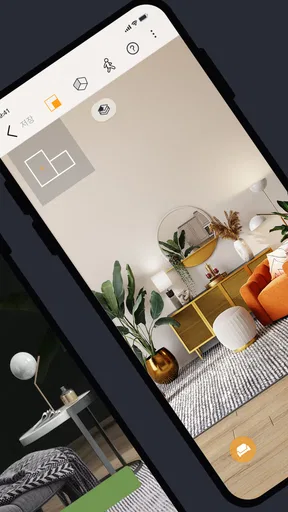
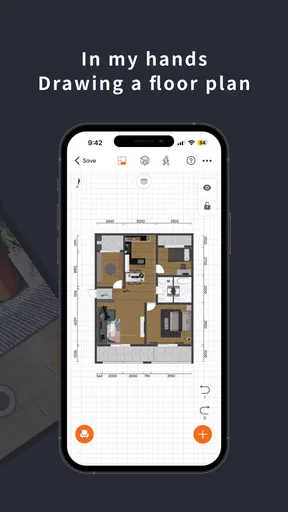
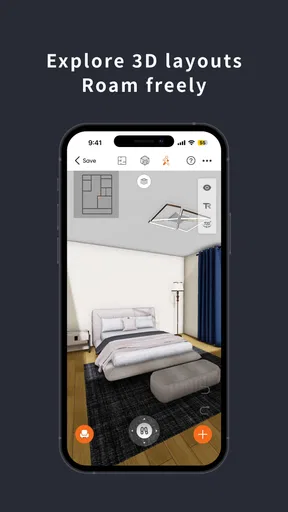
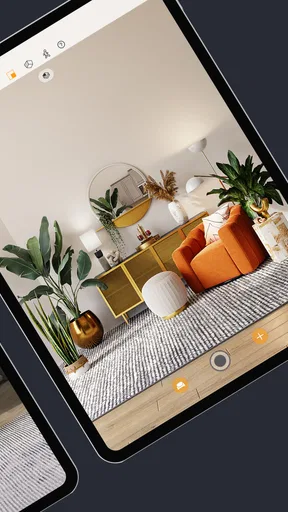
One of the first things I noticed was the variety of tools available for designing rooms. You can easily drag and drop walls, windows, and doors, making it simple to visualize changes in real time. Plus, the 3D rendering is surprisingly detailed for a mobile app, giving you a vivid picture of your future space.
Exploring the Features
Now, let's talk features. What really sets JoyPlan apart is the extensive library of furniture and decor items. You can customize everything from couches to carpets, ensuring every element fits your vision. And if you're like me, who loves to experiment with different styles, you'll appreciate the wide array of textures and colors at your disposal.
Another standout feature is the ability to adjust lighting. You can simulate natural light at different times of the day or play around with artificial lighting to see how it affects the mood of your rooms. This feature is a game-changer for anyone trying to create the perfect ambiance.
Collaboration and Sharing
One of the aspects I found particularly useful was the collaboration feature. You can easily share your designs with friends or family, or even with professionals if you're working on a real-life project. It's as simple as sending a link, and they can view your design in 3D, making feedback and collaboration seamless.
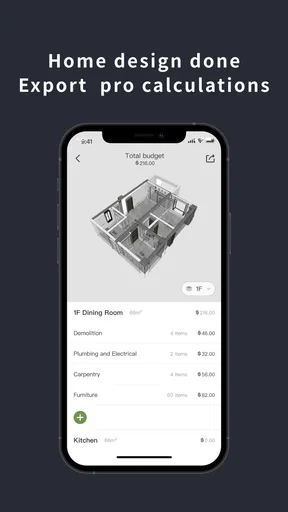
The app also allows you to export your designs in various formats, which is perfect for presenting your ideas to contractors or interior designers.
User Experience
As far as user experience goes, JoyPlan scores high in my book. Navigating through the app is smooth, and I didn't encounter any significant glitches. The developers seem to have put a lot of thought into making the app responsive and easy to use, which is crucial for maintaining your creative flow.
I also appreciated the tutorials and tips that pop up the first time you use certain features. They’re not intrusive but rather helpful reminders of how to get the most out of the app.
Who gets the most from it?
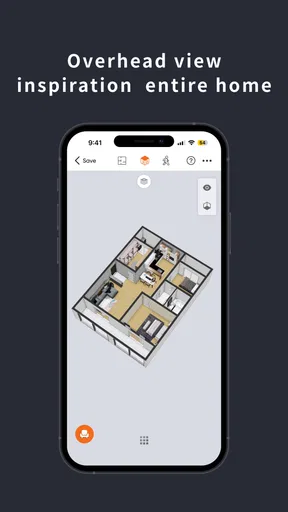
I see the strongest fit for someone who wants to make interior choices more concrete before moving furniture, ordering decor, or discussing a renovation. A 3D view can make a layout easier to explain than a quick sketch, while the furniture and finish options help turn a vague preference into a more specific visual direction. It is also a natural choice for a renter or homeowner who enjoys testing ideas without committing to a physical change.
For example, imagine I’m deciding whether a reading chair belongs beside a window or in an unused corner. I could create a rough room, try the two placements, and compare how each arrangement feels in the 3D view. I’d treat that as a way to narrow my preference, not as proof that a real piece will fit: the result is only as dependable as the dimensions and assumptions I enter.
A practical workflow, not just a pretty picture
My best tip is to decide what question the design is meant to answer before adding details. If I’m comparing furniture placement, I’d start with the room outline and openings, then add only the large items that affect circulation. If I’m choosing a mood, I’d keep the layout stable and test colors, textures, and lighting one change at a time. That makes it easier to see which decision actually improved the room instead of losing track amid many edits.
I’d also use the lighting controls as a comparison tool rather than a promise of how a room will look in every home. Trying different natural-light conditions or artificial lighting can reveal whether a color combination feels too dark or whether a corner needs a warmer mood. But a rendered scene remains a visualization; I would still check paint samples and lighting in the actual space before spending money.
Templates can help me get past the blank-page problem, while starting from scratch makes more sense when the room has an unusual layout or I want to control the plan closely. I’d choose the template route for quick inspiration and the custom route when accuracy matters more. In either case, I’d save a clean baseline before experimenting, so a bold change does not erase the version I preferred.
Where it sits beside other home-planning options
Compared with drawing a floor plan on paper, JoyPlan’s main advantage is that it lets me move from a flat arrangement to a 3D impression and try furniture and finishes in context. Compared with browsing inspiration photos, it gives me a way to test an idea against a room layout rather than simply collect looks I like. Those are useful distinctions when the question is “Will this arrangement feel right?” rather than “What style do I like?”
There are times I’d choose something else. A paper sketch can be faster for rough measurements during a site visit, and a specialist design or drafting tool may be a better fit when a contractor needs precise construction documentation. I wouldn’t rely on an attractive mobile rendering for structural decisions, building compliance, or exact ordering dimensions. For those, I’d take the concept to a qualified professional and verify measurements on site.
Costs, friction, and informed choices
The app is free to download, but optional purchases can range from $1.49 to $299.99 per item, so I’d inspect the price and what is included before confirming anything. The wide range makes it especially sensible to explore the free experience first and decide whether a paid item solves a real need. I would not pay just because a project feels unfinished; first I’d check whether the missing element is essential or whether a simpler design will answer my question.
JoyPlan is not the right choice for someone who wants a no-learning, one-tap room makeover or who needs professional-grade plans immediately. Design apps still ask users to make choices about layout, scale, and style, and a rendered result can encourage confidence that the real room may not support. I’d approach the visual polish with curiosity, but keep practical checks—measurements, access, budget, and advice from tradespeople—outside the app where they belong.
My cautious recommendation
Overall, I’d recommend JoyPlan to people who want an approachable way to compare room ideas and communicate a visual direction. Its combination of movable room elements, decor choices, lighting adjustments, and 3D presentation gives the process more substance than collecting screenshots alone. I’d use it for early decisions and conversation, while keeping sensitive details limited and checking sharing and purchase choices deliberately.
Final Thoughts
In conclusion, if you're looking for a mobile app that combines ease of use with powerful design tools, JoyPlan-Quick House Design 3D is a fantastic choice. It brings the world of 3D home design right to your fingertips, making it accessible for anyone who's curious about interior design.
Whether you're planning a major home renovation, or simply want to play around with ideas, this app offers endless possibilities. So why not give it a try and see where your creativity takes you?
Pros
- User-friendly interface for beginners.
- Real-time 3D rendering is smooth.
- Extensive library of design elements.
- Collaboration features for team projects.
- Cross-platform compatibility.
Cons
- Limited free version features.
- Occasional lag on older devices.
- In-app purchases can be pricey.
- No offline mode available.
- Learning curve for advanced features.
FAQs for JoyPlan-Quick House Design 3D
What is JoyPlan-Quick House Design 3D and who is it for?
JoyPlan-Quick House Design 3D is a user-friendly app designed for anyone interested in creating detailed 3D house designs quickly and efficiently. Whether you're a professional architect, a design student, or a homeowner planning a renovation, this app offers intuitive tools to bring your vision to life.
What features does JoyPlan-Quick House Design 3D offer?
The app provides a comprehensive suite of features, including customizable room layouts, extensive furniture libraries, and realistic 3D rendering. Users can easily manipulate walls, doors, and windows, and enjoy a variety of color and texture options to personalize their designs. Additionally, the app supports exporting designs for sharing or professional use.
How user-friendly is JoyPlan-Quick House Design 3D for beginners?
JoyPlan-Quick House Design 3D is designed with an intuitive interface, making it accessible for beginners. The app includes step-by-step tutorials and tips that guide users through creating their first project. Its drag-and-drop functionality and simple navigation enhance the learning experience, allowing new users to design confidently.
Are there any costs associated with using JoyPlan-Quick House Design 3D?
JoyPlan-Quick House Design 3D offers a free version with basic features. However, for advanced tools and more extensive libraries, users may need to purchase a subscription or one-time upgrades. These premium options provide enhanced capabilities for more detailed and professional-quality designs.
What are the system requirements for JoyPlan-Quick House Design 3D?
JoyPlan-Quick House Design 3D is compatible with both Android and iOS devices. It requires a minimum of Android 8.0 or iOS 12.0 for optimal performance. Users should ensure their devices have sufficient storage space and processing power to handle 3D rendering tasks efficiently.


